Right Click To Open A Document

0 comments

How to open a document/spreed sheet or any office document on right clicking with mouse on a desktop or in a folder in Linux(Ubuntu/Redhat)?
Ans : By default there is no option to open a document/spreed sheet on right clicking on a desktop or in a folder, This is default option in Window$. If you are core windows user and recently shifted to linux you will think why its not there in Linux. And how to get your right click option.
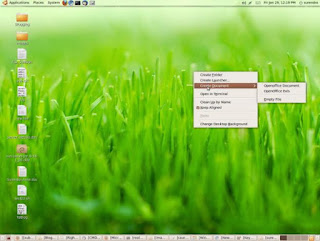


For those people here is the post for you guys on how to do it..

Step 1 : Check whether Templates directory in your home directory or not?
$cd
$ls
If this ls command did not show Templates folder please create one in your home directory
$ mkdir ~/Templates

Step2 : Now open a empty office document and just save it in to the Templates directory

Note : Please save the doc to windows xp doc extention if you want to open the docs in Windows. By default all the documents will be saved as .odt

Step3 : Now check by right clicking on empty desktop or in a folder whether you can see your option to open a new office document or not.


Enjoy the hack.

  • Like the post? Please Subscribe to free RSS feed to get updates
  • How To Change The Background Of A Terminal?

    0 comments

    These days I am tweeking around Ubuntu desktop, one tweek I did today. How to change the background of a terminial?
    The change really rocked my desktop look. Just have a look at my terminal after I have changed the background of it.


    So you people want to try?
    Ans :
    Just do as follows. have good image/desktop background ready to set it as a
    background for your terminal.

    Open an terminal> Edit > Profiles>

    Now press edit butten > background >background image

    Then brwose your image then press close. voyala. Your terminal background is changed to your required background. Enjoy tweeking.


  • Like the post? Please Subscribe to free RSS feed to get updates
  • How To Generate Randum Password

    0 comments

    Some times when creating bulk users, admins are forced to create complex passwords. But how to do it? How many you can set manually? Let me put it in this way. For one or two users we can think for a random password and assign to them. But if its 100 users? Naaa.. I cannot think for 100 passwds.

    So leave this job to Linux to create random passwords.
    you use below command to generate random passwords

    < /dev/urandom tr -dc A-Na-n1-9_ head -c8
    This will just generate random
    8 lenght password

    For example :
    See just typing the above command will generate a random password

    root@ps6061:~# < /dev/urandom tr -dc A-Na-n1-9_ head -c8 57fg67gKroot@ps6061:~# < /dev/urandom tr -dc A-Na-n1-9_ head -c8 FN8ahe8broot@ps6061:~# < /dev/urandom tr -dc A-Na-n1-9_ head -c8 eLhLLNCGroot@ps6061:~# < /dev/urandom tr -dc A-Na-n1-9_ head -c8 FK3CC9GNroot@ps6061:~# < /dev/urandom tr -dc A-Na-n1-9_ head -c8 cA8H24Mlroot@ps6061:~# < /dev/urandom tr -dc A-Na-n1-9_ head -c8
    9eDL39I_root@ps6061:~#

    Here is a script written by me to automate entire 20 user account creation.
    #!/bin/bash
    #Author:Surendra Kumar Anne
    #Purpose:To automate user creation
    #Date/Time:29-01-2010.19:10
    mkdir -p /home/admin/useraccounts
    for (( i=0; i<=20; i++ )) do useradd user$i < /dev/urandom tr -dc A-Na-n1-9_ head -c8 > /tmp/passwd.txt
    cat /tmp/passwd.txt passwd --stdin user$i
    echo -e "Username:user$i" > /home/admin/useraccounts/user$i
    echo -e "password:" >> /home/admin/useraccounts/user$i
    cat /tmp/passwd.txt >> /home/admin/useraccounts/user$i
    done
    rm -rf /tmp/passwd.txt

    Note :
    When password generating I have just created a password which will not contain o(small ooo), O(capital OO), 0(zero). This is to remove confusions for users. Some times user will get confusion when using these characters. If you want all the characters from a to z, A to Z, and 0-9 just use below code
    .

    < /dev/urandom tr -dc A-Za-z0-9_ head -c8

  • Like the post? Please Subscribe to free RSS feed to get updates
  • Archive

    Translate this page


    The Linux Juggernaut | Copyright 2006-2009 Surendra Kumar Anne | Surendra's Home Page | Give us feedback how we are doing, Click here