Showing posts with label How-To's. Show all posts

How To Access Web Server Through IP Address?

0 comments

How to access web server through ip address(not the default site)?

Step1 : check for the package installed or not

#rpm -qa | grep httpd

Step2 : Install the package

#yum install httpd

Step3 : Create the root web directory and a test index.html for this testing.

I want to create my web directory in /ipbasehost

#mkdir /ipbasehost

Now create index.html and try to write something in to that file then save the file.

#vi /ipbasehost/index.html

save and exit the file.

Step4 : Now edit the httpd.config file

#vi /etc/httpd/conf/httpd.conf

Go to last line and write the below content

DocumentRoot /ipbasehost/
DirectoryIndex index.html

Save the file and exit.

Let me explain above four lines

=> This indicates we are creating a virtualhost who's IP addresse is 192.168.0.1

DocumentRoot /ipbasehost/ => This indicates where is my document root i.e., all my web content should be placed under /ipbasehost/ So this content will be published through website.

DirectoryIndex index.html => This indicates what is the default file to be open when this site is accessed. So when you type ip address(here its 192.168.0.1) in browser it will present with
index.html content.

=>This is to specify the end of that virtual host.

Now save the file and exit.

Step5 : Check for the syntax errors in the httpd.conf file before restarting the apache service.

#httpd -t

Or

#httpd -k graceful

Step6 : Now start the service and then add it to booting scripts so that it will start automatically at every boot of the system

#service httpd restart

#chkconfig httpd on

Step7 : Now check the site using 192.168.0.1 ip address in your browser.

  • Like the post? Please Subscribe to free RSS feed to get updates
  • How To Configure And Install Sendmail In Linux?

    0 comments

    Send mail is one of the old and widely used mail delivery agent/Mail system.


    First Please check this link to know more about Mail Server

    Configuration Of Sendmail :
    1. All the sendmail configuration files are located at /etc/mail
    2. Main configuration files are access, sendmail.mc and send mail.cf.
    3. In this example my domain is example.com and my mail server host-name is mx.example.com

    Step1 : Install sendmail packages
    #yum install sendmail*
    #yum install m4

    Step2 : Configure DNS entries in forward look-up zone file
    #vi /path/to/your/forward/lookup/zone/file
    Save the file and exit.

    Step3 : Check for configuration errors and reload the DNS server
    #named-checkzone example.com /path/to/your/forward/lookup/zone/file
    #service named reload

    Step4 :
    All the sendmail configuration files are stored in /etc/mail and now configure relay ip address list

    Why we require this relay list?
    Ans : This is because to secure your sendmail not get spam. So what ever Network/host-names you specified in this access file those networks/host-names only get access to our sendmail.
    #vi /etc/mail/access

    Entries as follows.
    Save and exit the file

    Step5 : Now update the file to sendmail database with makemap command

    Note : After executing below command you will find access.db, this is the indication that your makemap command worked perfect and database have been updated successfully.

    Note : So if you want to relay more networks you have to edit access file.
    #makemap hash access < access

    Step6 : Configure sendmail.mc file
    #vi /etc/mail/sendmail.mc

    Step6(a) : Search for "confAUTH_OPTIONS" with out quotes open a new line after that and enter below entry in that line
    define(`confDOMAIN_NAME', 'example.com')dnl

    Caution : When using the quotes, "`" opening quote is near to escape key and "'" closing quote is at enter key.

    Step6(b)
    :
    Search for 127.0.0 line and comment that line if its not commented.
    dnl #DAEMON_OPTIONS(`Port=smtp,Addr=127.0.0.1, Name=MTA')dnl

    Step6(c) : Search for LOCAL_DOMAINN with out quotes and modify the line as below from.
    LOCAL_DOMAIN(`localhost.localdomain')dnl

    to
    LOCAL_DOMAIN(`mx.example.com')dnl

    Step6(d) : Search for "MASQUERADE_AS" with out quotes and modify the line as below from..
    dnl MASQUERADE_AS(`mydomain.com')dnl

    to

    MASQUERADE_AS(`example.com')dnl
    Now save the file and exit

    Step7 : Now compile sendmail.mc changes to reflect them in sendmail.cf
    #m4 sendmail.mc > sendmail.cf

    Step8 : Now start/restart the sendmail service
    #service sendmail restart

    Step9 : Now add the sendmail service to chkconfig list to start automatically at booting times
    #chkconfig sendmail on

    Dovecot Configuration :

    Step1 : Install the dovecot package
    #yum install dovecot

    Step2 : Search for "protocols" in /etc/dovecot.conf file and replace with below mention line.
    #vi /etc/dovecot.conf#protocols = imap imapsReplace this to
    protocols = pop3 imap imaps

    Step3 : Start the dovecot service.
    #service dovecot restart

    Step4 : Now add the dovecot service to chkconfig list to start automatically at booting times
    #chkconfig dovecot on

    Testing the mail server

    Step1 :
    Try sending mail using telnet command
    #telnet mx.example.com 25
    Server responds with: 220 mx.example.com SMTP then type HELLO
    HELLO

    Now Server responds with: 250 OK now send MAIL FROM:root@example.com

    Now Server responds with: 250 Address Ok. Now type


    Now Server responds with: 250 user@example.com OK. now type DATA to enter mail content.

    DATA
    Now Server Responds (or may not): 354 Enter Mail
    Enter message, then on a new line,.

    exit

    Now the message will be sent to user@example.com.
    Now log-in to that user and try to see the mail.
    #su

    user$mail

    Here you can see your mail.As send mail configuration is huge and depends on the requirement. Here the configuration which I have shown you is basic configuration.

    Some FAQ's:

    Q. What is the port number for SMTP?
    Ans : 25

    Q. What is the port number for POP3, IMAP?
    Ans : 110, 143

    Q. What is present sendmail version?
    Ans : 8

    Q. What are other highly used mail servers in world?
    Ans : qmail, exchange etc

    Do you want to find port numbers to other
    protocols too?
    Use google squared. My example is here

  • Like the post? Please Subscribe to free RSS feed to get updates
  • How To Upgrade An Installed Source Package?

    0 comments

    I have installed a package from source, now I want to upgrade the older version to new version which is available.


    How can I upgrade already installed source package on my system?


    Ans : This question arises to all the admins who do installation from source package. To upgrade a source package follow the same steps to you have did at the time of first installation through source. Package as shown below..


    Step1: unpack the new source code in tmp directory.


    #cd /tmp
    #tar xvfz packagname.tar.gz
    #cd packagename
    #./configure –prefix=/path/to/old/installation
    #make
    #make check
    #make install


    Step2 : Now check what is the version if its updated to new version for example


    If you install squid then execute below command


    #squid -v


  • Like the post? Please Subscribe to free RSS feed to get updates
  • How To Install Apache Tomcat on Linux(Redhat/Ubuntu)?

    1 comments

    How to install Apache tomcat on Linux(Redhat/Ubuntu)?

    What is Apache tomcat?
    Ans : ApacheTomcat is an open source web application server which supports J2ee Servlets, JavaServer, Pages(JSP) and API's. Tomcat should not be confused with Apache web server which an HTTP web server.
    ---Wikipedia.

    Some terminology about Apache tomcat.

    Apache Tomcat can be configured by editing server.xml file. Those who knows apache web server. This server.xml can be taken as synonimas to httpd.conf file.

    Servlet is defined as a way add dynamic content to a Web server using the Java platform. And a servlet container is a compiled, executable program. The servlet container name is tomcat is catalina.

    Pre requists for Apache tomcat are
    1. java
    2. JDK

    Step by step for installing Apache tomcat

    Note : Avoide installing tomcat from reposatories, always prefer to install it from source downloaded from apache site.

    Step1 : Install all the prequistes

    Redhat :

    #yum install java

    Ubuntu :

    #apt-get install java

    Step2 : Download tomcat source package and uncompress it.
    Redhat/Ubuntu
    #cd /opt
    #wget http://www.trieuvan.com/apache/tomcat/tomcat-6/v6.0.29/bin/apache-tomcat-6.0.29.tar.gz
    #tar xvfz apache-tomcat-6.0.29.tar.gz

    Step3 : Setup the paths for Catalina and others.
    Setting catalina paths

    Redhat/ubuntu

    CATALINA_HOME=/opt/apache-tomcat-6.0.29
    CATALINA_BASE=/opt/apache-tomcat-6.0.29

    Setting java paths

    Check what java versions are installed in your system

    #update-alternatives --config java


    This command will display which is default java version used by your machine.

    Example output :

    # update-alternatives --config java

    There are 2 programs which provide 'java'.

    Selection Command
    -----------------------------------------------
    1
    /usr/lib/jvm/jre-1.4.2-gcj/bin/java
    *+ 2
    /usr/lib/jvm/jre-1.6.0-openjdk/bin/java

    Enter to keep the current selection[+], or type selection number:

    If you see above the default java version is 1.6 so set the path to /usr/lib/jvm/jre-1.6.0-openjdk

    JAVA_HOME=/usr/lib/jvm/jre-1.6.0-openjdk
    JDK_HOMe=$JAVA_HOME

    Step4 : Now start tomcat server

    #/opt/apache-tomcat-6.0.29/bin/sartup.sh

    Sample output.

    Using CATALINA_BASE: /opt/apache-tomcat-5.5.26

    Using CATALINA_HOME: /opt/apache-tomcat-5.5.26
    Using CATALINA_TMPDIR: /opt/apache-tomcat-5.5.26/temp
    Using JRE_HOME:
    /usr/lib/jvm/java-1.6.0-openjdk-1.6.0.0/

    Step5 : By default Apache Tomcat will be hosted onlocalhost : 8080 port by default. So try to access the site with web browser

    http://localhost:8080
    or
    http://localhost:8080
    or
    http://systemname:8080

    Stay tuned to other posts about troubleshooting tomcat installation.

  • Like the post? Please Subscribe to free RSS feed to get updates
  • How To Set Java Path In Linux?

    0 comments

    How to set java path in Linux?

    Ans : Check where java is installed by using below command

    #update-alternatives --config java
    This command will show installed java packages in your machine.

    Example output :
    # update-alternatives --config java

    There are 2 programs which provide 'java'.

    Selection ----------------------------------------------- 1 /usr/lib/jvm/jre-1.4.2-gcj/bin/java *+ 2
    From above you can see java version in use it. 1.6.

    Setting java path(In Temporary way)

    #JAVA_HOME=/usr/lib/jvm/jre-1.6.0-openjdk #export $JAVA_HOME

    Setting java path (In Permanent way)
    Edit ~/.bashrc and place below two lines in that file and save the file.

    Vi ~/.bashrc
    JAVA_HOME=/usr/lib/jvm/jre-1.6.0-openjdk export $JAVA_HOME

    Now save the file and exit, then logout and login to make those changes to reflect.

    Command

    /usr/lib/jvm/jre-1.6.0-openjdk/bin/java

  • Like the post? Please Subscribe to free RSS feed to get updates
  • How To Change The Java Version In Linux?

    0 comments

    This post is regarding how to change java version if multiple java versions are installed?


    Check what are the java versions are installed on your system


    #java -version


    Example output

    OpenJDK Runtime Environment (build 1.6.0-b09)

    OpenJDK Client VM (build 1.6.0-b09, mixed mode)


    So now I want to change the one version to another version.

    If more than one java is installed. Execute below command to see how many java versions are installed? And what is the default version (Default version will be indicated by *)


    #update-alternatives --config java


    This command will display which is default java version used by your machine..

    Example output.

    # update-alternatives --config java


    There are 2 programs which provided 'java'.


    Selection Command


    -----------------------------------------------


    1. /usr/lib/jvm/jre-1.4.2-gcj/bin/java


    *+ 2 /usr/lib/jvm/jre-1.6.0-openjdk/bin/java


    Enter to keep the current selection[+], or type selection number:


    So if you want to change the java version from 1.6 (now 2 is default version as shown) to 1.4 just press “1 with out quotes.

    Please let us know if you know other way of changing java version.

  • Like the post? Please Subscribe to free RSS feed to get updates
  • How To Enable Verbose Mode For SSH Logins?

    0 comments

    How we can login to remote server through ssh?

    #ssh user@servername

    or

    #ssh -l user servername

    or

    #ssh ip-add

    So when you will execute the above command you will get the password prompt. But if you want to see what will happen when you execute ssh command you have to enable verbose or debugging mode. To do this we have to apply -v option at the time of login as shown in below example.

    #ssh -v surendra@ftp2.linuxnix.com


    root@krishna:/home/surendra# ssh -v surendra_a@ftp2.linuxnix.com
    OpenSSH_5.5p1 Debian-4ubuntu4, OpenSSL 0.9.8o 01 Jun 2010
    debug1: Reading configuration data /etc/ssh/ssh_config
    debug1: Applying options for *
    debug1: Connecting to ftp2.linuxnix.com [92.32.56.78] port 22.
    debug1: Connection established.
    debug1: permanently_set_uid: 0/0
    debug1: identity file /root/.ssh/id_rsa type -1
    debug1: identity file /root/.ssh/id_rsa-cert type -1
    debug1: identity file /root/.ssh/id_dsa type -1
    debug1: identity file /root/.ssh/id_dsa-cert type -1
    debug1: Remote protocol version 1.99, remote software version OpenSSH_4.0
    debug1: match: OpenSSH_4.0 pat OpenSSH_4*
    debug1: Enabling compatibility mode for protocol 2.0
    debug1: Local version string SSH-2.0-OpenSSH_5.5p1 Debian-4ubuntu4
    debug1: SSH2_MSG_KEXINIT sent
    debug1: SSH2_MSG_KEXINIT received
    debug1: kex: server->client aes128-ctr hmac-md5 none
    debug1: kex: client->server aes128-ctr hmac-md5 none
    debug1: SSH2_MSG_KEX_DH_GEX_REQUEST(1024<1024<8192) sent
    debug1: expecting SSH2_MSG_KEX_DH_GEX_GROUP
    debug1: SSH2_MSG_KEX_DH_GEX_INIT sent
    debug1: expecting SSH2_MSG_KEX_DH_GEX_REPLY
    debug1: Host 'ftp2.linuxnix.com' is known and matches the RSA host key.
    debug1: Found key in /root/.ssh/known_hosts:1
    debug1: ssh_rsa_verify: signature correct
    debug1: SSH2_MSG_NEWKEYS sent
    debug1: expecting SSH2_MSG_NEWKEYS
    debug1: SSH2_MSG_NEWKEYS received
    debug1: Roaming not allowed by server
    debug1: SSH2_MSG_SERVICE_REQUEST sent
    debug1: SSH2_MSG_SERVICE_ACCEPT received
    debug1: Authentications that can continue: publickey,password,keyboard-interactive
    debug1: Next authentication method: publickey
    debug1: Trying private key: /root/.ssh/id_rsa
    debug1: Trying private key: /root/.ssh/id_dsa
    debug1: Next authentication method: keyboard-interactive
    debug1: Authentications that can continue: publickey,password,keyboard-interactive
    debug1: Next authentication method: password
    surendra_a@ftp2.linuxnix.com's password:
    debug1: Authentication succeeded (password).
    debug1: channel 0: new [client-session]
    debug1: Entering interactive session.
    debug1: Sending environment.
    debug1: Sending env LANG = en_IN
    Last login: Thu Dec 9 20:02:47 2010 from 1.23.6.79


    After logout


    debug1: client_input_channel_req: channel 0 rtype exit-status reply 0


    debug1: channel 0: free: client-session, nchannels 1
    Connection to ftp2.linuxnix.com closed.
    Transferred: sent 2072, received 2072 bytes, in 27.7 seconds
    Bytes per second: sent 74.8, received 74.8
    debug1: Exit status 0


    So if you want more verboseness you can use up to 3rd level(-vvv) as shown below

    #ssh -vvv surendra_a@ftp2.linuxnix.com


  • Like the post? Please Subscribe to free RSS feed to get updates
  • How To Change The Date In Linux?

    0 comments

    How can we change the date/time in linux?
    Ans : Changing date in linux is bit confusing. If you want to change date in GUI its very much easy and if you want to change it when it comes to CLI its bit hard to remember it.

    Date is the command to check whats the present date
    #date

    To change the date use below command
    #date MMDDHHMMYYYY.ss

    MM => Two digit month value

    DD => Two digit day value

    HH => Two digit hour value

    MM => Two digit minuite value

    YYYY => Four digit year value

    ss => Two digit seconds value(very rare we will be using this)

    Example1 : I want to change the date to Nov 24 1:36 PM 2010

    #date 112413362010

    Example2 : I want to change the date to Jan 9th 8:05.04 AM 2010

    #date 010908052010.04

    Now the date will be changed to your required date.

  • Like the post? Please Subscribe to free RSS feed to get updates
  • How To Set A PHP Path In Linux?

    0 comments

    How can we set PHP path in linux?
    Ans : When you install PHP and host some .php files on webserver your web server will not detect it. This is because your Apache server does not know how to interprit PHP files? And and where is php located? To eleminate this issue we have to set the php path in main php configuration file php.ini located in your machine. As the linux is open source and the location of this file differs from different flavors, so better option is to search for php.ini file as shown below.

    find / -iname php.ini

    or some common locations for Redhat and Ubuntu are shown below

    For Redhat flavors

    /etc/php.ini

    For Ubuntu Flavors

    /etc/php5/apache2/php.ini

    To search for include_path and uncomment that before changes.

    ;include_path = ".:/usr/share/php"

    After changes.

    include_path = ".:/usr/share/php"

    Now save and exit the file. And you have to restart the apache server to detect this settings.

    For Redhat

    #service httpd restart

    For Ubuntu

    /etc/init.d/apache2 restart

    Now start coding in PHP and enjoy the php scripting.

  • Like the post? Please Subscribe to free RSS feed to get updates
  • How to implement ip forwarding in Linux

    2 comments

    IP forwarding is a concept to make Linux machine to forward data from one network to another, this is same as a router(A router is a device which is used to forward packets from one point to other point depending on the packet destination/rules etc).

    Why we require IP forwarding on a Linux machine?

    Ans : We require IP forwarding on a Linux machine because to make it as a router or proxy server to share one internet connection to many client machines.

    Let me explain how this will work with small example.

    You have 2 machines which are in different network(PC1 in 10.0.0.0/255.0.0.0 network and PC2 in 192.168.0.0/255.255.255.0 network) and connected with a Linux machine(which is having two network interfaces). The IP address is as follows..

    PC1: 192.168.0.1/255.255.255.0 default gateway:192.168.0.2

    PC2: 10.0.0.1/255.0.0.0 default gateway:10.0.0.2

    Linuxbox eth0 : 192.168.0.2/255.255.255.0

    eth1 : 10.0.0.2/255.0.0.0

    and Linux machine is having two LAN cards which are connected to both the

    machines as shown below
    So do you think PC1 is capable of communicating with PC2?
    Ans :
    The answer to this question is No.

    How to make PC1 to communicate with PC2?
    Ans :
    The answer is enable ip forwarding on Linux machine. Some times this is called as bridging two networks.

    To achieve IP forwarding we have to edit /etc/sysctl.conf as shown below. Open sysctl.conf and change the value of “net.ipv4.ip-forard” from 0 to 1 and save the file

    #vi /etc/sysctl.conf

    net.ipv4.ip-forard = 0

    to

    net.ipv4.ip-forard = 1

    Once its done still you are not able to ping from PC1 to PC2. We have to restart the linuxbox to take this update to kernel.

    Why to restart if its a production machine try below command to make your linuxbox aware of IP forwarding with out a restart.

    echo 1 > /proc/sys/net/ipv4/ip-forward

    Now try to ping from PC1 to PC2 which will ping successfully.

  • Like the post? Please Subscribe to free RSS feed to get updates
  • Equivalent Tool For WINscp in Linux

    0 comments

    Is there any tool which is equivalent to do what WINscp does in Windows?

    Winscp is widely used tool in windows to access any Linux/Nix machine to transfer data(files/folders). Its look similar to FTP client such as filezilla client.
    Suppose you are in Linux machine and want to mount(connect) a folder similar to WinSCP with SSH protocol, then this post is for you. This tool will work to connect http, https, ftp, samba share protocols etc.

    In Linux we have one utility called nautilus to do this work.
    Install natutilus

    Redhat:

    #yum install nautilus

    Ubuntu:

    #apt-get install nautilus

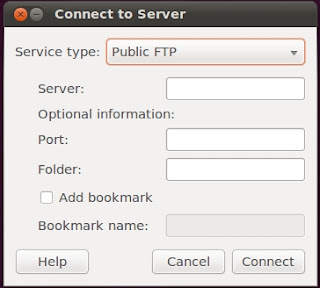
    Try to access Nautilus as shown below in screen by screen shot manner

    Go to places and the slect connect to server.


    Now you can see a pop-up window which shows the service type.


    Then select the protocol as ssh.


    Then specify the server ip, port where ssh service is running, user name to connect, then press connect


    Now it will ask for the user’s password, enter the password and connect it.


    This screen shot show the remote server content.


  • Like the post? Please Subscribe to free RSS feed to get updates
  • How To Assign Default Gateway In Linux?

    0 comments

    How to Assign Default gateway in linux?
    Ans : In linux Default gateway is set through route command or GUI tools.

    Through Route command
    #route add default gw default-gateway

    Example :
    #route add default gw 192.168.0.1
    Here 192.168.0.1 is the default gate of my system.

    Through GUI tools
    Use system-config-network in terminal or GUI to set up default gateway.

  • Like the post? Please Subscribe to free RSS feed to get updates
  • How To View Default Gateway In Linux?

    0 comments

    This is asked in some of the interviews. We can get default gateway information in linux in many ways. Such as viewing network card file or executing a command.
    To see default gateway by view network interface card file content.
    #cat /etc/sysconfig/networking/devices/interface-no

    Example :
    [root@example ~]# cat /etc/sysconfig/networking/devices/ifcfg-eth0
    # Intel Corporation 82546EB Gigabit Ethernet Controller (Copper)
    DEVICE=eth0
    BOOTPROTO=none
    HWADDR=00:02:a5:4c:af:99
    ONBOOT=yes
    TYPE=Ethernet
    NETMASK=255.255.255.0
    IPADDR=10.200.0.21
    GATEWAY=10.200.0.1

    Through route command
    route

    Example:
    Kernel IP routing table
    Destination Gateway Genmask Flags Metric Ref Use Iface
    192.168.0.0 * 255.255.255.0 U 0 0 0 eth1
    10.78.0.0 * 255.255.255.0 U 0 0 0 eth0
    169.254.0.0 * 255.255.0.0 U 0 0 0 eth1
    default 10.200.0.1 0.0.0.0 UG 0 0 0 eth0

    Through ip route command
    ip route

    Example :
    [root@example ~]# ip route
    192.168.0.0/24 dev eth1 proto kernel scope link src 192.168.0.1
    10.78.0.0/24 dev eth0 proto kernel scope link src 10.78.0.21
    169.254.0.0/16 dev eth1 scope link
    default via 10.200.0.1 dev eth0

    Through netstat command
    netstat -r

    Example:
    [root@example ~]# netstat -r

    Kernel IP routing table
    Destination Gateway Genmask Flags MSS Window irtt Iface
    192.168.0.0 * 255.255.255.0 U 0 0 0 eth1
    10.78.0.0 * 255.255.255.0 U 0 0 0 eth0
    169.254.0.0 * 255.255.0.0 U 0 0 0 eth1
    default 10.200.0.1 0.0.0.0 UG 0 0 0 eth0

    Note:For any system/server there will be only one default gateway, if suppose if you assign two default gateways to your machine, your system will not come to know where to send the packets.

  • Like the post? Please Subscribe to free RSS feed to get updates
  • How To Assign Or Change Hostname In Linux?

    0 comments

    Computers are assigned with a name as we do for humans beings. This is called hostname in computer world. So how to assign a hostname to a Linux system? Its very much simple. Before doing this we should know every task in Linux can be done in two ways :

    1. Temporary way(once you boot your system the changes made in this way will go away)
    2. Permanent way(Changes made in this way will be retained even after rebooting of the system).
    Before changing the hostname, check what is your present system name by using hostname command
    #hostname
    This command will show present system name.
    Now we will see how to assign a host name to a linux machine in both(temporary as well as permanent) ways.

    Temporary way : Use hostname command to change the host name
    #hostname your-system-name

    Example : #hostname office-laptop.example.com

    Permanent way : Change hostname in Redhat/CentOS/Fedora :

    Edit /etc/sysconfig/network file, use HOSTNAME variable in that file to denote hostname.
    #vi /etc/sysconfig/network
    HOSTNAME=office-laptop.example.com
    Save the file and exit
    Then your hostname is changed permanently to your desired name.

    Change hostname in Ubuntu/Debian : Edit /etc/hostname, just write down what is your hostname in to that file.
    #vi /etc/hostnameoffice-laptop.example.com
    Save the file and exit
    Then your hostname is changed permanently to your desired name.

  • Like the post? Please Subscribe to free RSS feed to get updates
  • How To Find Web Server Type Running On A Linux Or Windows Machine?

    0 comments

    How to find web server type running on a Linux or windows machine? Is there any linux command to get the details?
    Ans :
    Yes its possible in Linux by using curl(client for URL) command. To find which web server is running on a machine use blow command.

    #curl -I www.linuxnix.com
    # curl -I itig

    HTTP/1.1 200 OK
    Via: 1.1 us-PROXY1, 1.1 us-PROXY2
    Connection: close
    Proxy-Connection: close
    Expires: Mon, 1 Jan 2001 00:00:00 GMT
    Date: Mon, 14 Jun 2010 03:26:55 GMT
    Content-Type: text/html; charset=utf-8
    Server: Apache/2.2.3 (Red Hat)
    X-Powered-By: PHP/5.1.6
    Set-Cookie: b2933756b1f0288a74dd630e51954bff=5sl7jaqpgliambi2fq7q3ailv6; path=/
    P3P: CP="NOI ADM DEV PSAi COM NAV OUR OTRo STP IND DEM"
    Last-Modified: Mon, 14 Jun 2010 03:26:55 GMT
    Cache-Control: no-store, no-cache, must-revalidate, post-check=0, pre-check=0
    Pragma: no-cache

    In the above out put we can see server as Apache 2.2.3.

    cURL is an excelent tool to do many thing such as

    1. File transfers(FTP, FTPS, HTTP, HTTPS, SCP, SFTP, TFTP, TELNET, DICT, LDAP, LDAPS, FILE, IMAP, SMTP, POP3 and RTSP)
    2. Can understand SSL certificates
    3. Can understand Proxies
    4. Can understand Cookies
    5. User+password authentication (Basic, Digest, NTLM, Negotiate, kerberos...)
    6. File transfer resume
    7. Proxy tunneling etc..

  • Like the post? Please Subscribe to free RSS feed to get updates
  • How To Play WMV,WMA, MP3 Files In Linux?

    0 comments

    By default most of the Linux systems will not support any of the mention formates. In order to play these files in Linux we require to install mplayer or vlc. My favourite one is VLC(VideoLAN Client). With which you can play most of the media files and even we can play streaming video and audio files. VLC uses ffmpeg codecs back end to convert/play many formats.

    VLC support below formats :
    3GP(.3gp) ==> 3rd generation phone format, This video format is good for mobile phones.

    AIFF/ASF(.asf, .wmv) ==> These are windows proprietary format, ASF(Active Streaming Format) is used for streaming purpose and wmv(Windows media video) for playing windows videos.

    AU(.au) ==> Simple Audio file introduced by Sun micro systems.

    AVI(.avi) ==>AVI(Audio video interleave) ==> This is one more format developed by MS. Due to separation of Audio and Video the file size is less when compared to normal WMV files, So most of the times when you download movies from torrents they are in AVI.

    FLV (.flv) ==> FLash Video, which is used for streaming again. For example the popular video site Youtube.com uses this format to play videos for users.

    MOV(.mov) ==> Movie file format which is default format in Mac OS.

    MP4(.mp4) ==> Compressed format for Audio, The songs which are stored in mp4 occupies less space then mp3. So many users when they want to listen to songs on their mobile phones uses this format to store songs.

    OGG(.ogm, .ogg) ==>Again a streaming video/audio format MKV(.mkv, .mka).

    MPEG-2/TS(.ts, .mpg) ==> A Video format.

    MPEG-2/ES, PS, PVA, MP3(.mpg, .mp3, .mp2) ==> Audio format
    NSC(.nsc)
    NSV(.nsv)
    Nut(.nut)

    Real(.ra, .ram, .rm, .rv , .rmbv) ==> Real media formats, previous versions did not support will. But now this format is supported well.

    Raw(a52, dts, aac, flac, .dv, .vid)
    True Audio Codec(.tta, .tac)
    Ty Tivo(.ty)
    Wav(.wav, .dts)
    Xa(.xa)

    To install in VLC in Redhat :
    #rpm -ivh vlc


    To install vlc in Ubuntu :
    apt-get install vlc

    Once you install vlc will be there in applications -->Sound and Video in menu. Just open any mp3/video file with VLC and enjoy.

    These days people are using VLC extensively for playing their Video/Audio files. This download counts are huge.

  • Like the post? Please Subscribe to free RSS feed to get updates
  • Find Memory Or RAM And Swap Usage In Linux

    0 comments

    RAM plays an important role in the performance of a system. So we should monitor this memory usage to troubleshoot system. free is the basic command to get details of RAM and swap usage.

    #free

    Example :

    # free
    total used free shared buffers cached
    Mem: 3059872 2842016 217856 0 33936 2012684
    -/+ buffers/cache: 795396 2264476
    Swap: 2000052 67672 1932380


    When you see its giving total size, used and free size in bytes. If you want to see in MB specify

    -m option in free

    #free -m

    Example :

    # free -m
    total used free shared buffers cached
    Mem: 2988 2784 203 0 33 1974
    -/+ buffers/cache: 776 2211
    Swap: 1953 66 1887


    Any other commands to check RAM?
    The answer for this is yes.
    1. Use proc file system to get detailed RAM usage of the system.

    #cat /proc/meminfo

    2. Use top command to see RAM usage


    So with top too you can see RAM usage live.

  • Like the post? Please Subscribe to free RSS feed to get updates
  • How To Find And Remove Core Files In Linux?

    0 comments

    What is a"Core file" ? Ans : A core file is created when a program is crashed/stoped abnormally due to some bug. This will be huge size which contains all the memory info, crash info which is used for programmers to debug the issue and find a solution or patch to that bug.

    Why we system administrators are interested in that core files?
    Ans : This is because of their size. As we do monitoring of systems on daily basis but suddenly your disk is full one day when you came to office, you are total blank thinking how come disk is full though there is no much user activity etc. So core files are one reason which will eat up our disk. Which you have to check for when sudden disk activity is observed.

    How to find core files ?
    #find / -name core

    This find command will search entire filesystem for core files.. once you find them use rm command to remove those files..
    #rm -rf core

    So how it got its name?
    A core dump file gets its name from an old memory technology using tiny magnetic cores for storage.

  • Like the post? Please Subscribe to free RSS feed to get updates
  • How To Kill Defunct Or Zombie Process?

    1 comments

    A "defunct" processes is also known as a "zombie" processes. A Zombie process is referred as dead process which is receding on your system thought its completed executing. In one shot we can say its a dead processes. This process will be in your process table and consuming your memory. Having more defunct process will consume your memory which intern slows your system. We have to kill the defunct process in order to free RAM and make system stable.

    Why defunct process are created?
    Ans :
    When ever a process ends all the memory used by that process are cleared and assigned to new process but due to programming errors/bugs some processes are still left in process table. These are created when there is no proper communication between parent process and child process.

    Some FAQ?

    1. How to find a defunct process?
    And : Grep defunct value in ps -ef output
    #ps -ef grep defunct

    2. How can i kill a defunct process?
    And :
    Just use kill command
    #kill defunct-pid

    3. Still not able to kill?

    Ans : Then use kill -9 to force kill that process
    #kill -9 defunct-pid

    4. Still have an issue in killing it?

    Ans : Then try to kill its parent id and then defunct.
    #kill parent-id-of-defunct-pid
    Then

    #kill -9 parent-id-of-defunct-pid

    5. Still having defunct?

    Ans : If you still find defunct process eating up RAM then last and final solution is to reboot your machine.

    6.What is orphan process?
    Ans : An orphan process is said to be a process which runs though parent process is terminated, these process do not know what to do and when to terminate.

    7. What is difference between orphan and defunct processes?
    Ans :
    A defunct process is a dead process where there is no execution happening where as orphan process is a live process which is still in execution state but don't have parent process

    I am having a system which daily creates defunct process, I cannot sit and kill these process on daily basis.


    How to get rid of this problem?
    Ans : Just write a shell script to grep defunct process and kill them by putting this script in corntab.

  • Like the post? Please Subscribe to free RSS feed to get updates
  • Archive

    Translate this page


    The Linux Juggernaut | Copyright 2006-2009 Surendra Kumar Anne | Surendra's Home Page | Give us feedback how we are doing, Click here